Plannr
A syllabus is written for people. Plannr turns it into dates a calendar can hold, and makes the student check every one first.
 Syllabus to calendar
- iOS · SwiftUI, Python · FastAPI
- Free public TestFlight beta
- UCSB CS 148 team project, Winter 2026
- Continued alone, Aug – Sep 2026
The dates are already written down. Just not like dates.
Every instructor writes a syllabus their own way, and a term brings a handful of them. Deadlines sit in a table on one page, in a sentence on another, in a phrase that only makes sense next to the start date.
Plannr starts from the document as it is: a PDF with selectable text, or the text pasted in. Scans and photos aren’t supported in the beta yet.
ASTRO 101 · Introduction to the Solar System
Winter 2027 · Lecture M W F 10:00–10:50 AM · Section Thursday 3:00–3:50 PM
Week 1 begins Monday, January 4.
- Problem Set 1 — due Friday of Week 2Friday of Week 2 is a calculation: the first day of class, plus one week, plus four days.
- Observation Report 1 — due Wednesday, Week 4
- Midterm Exam — Friday of Week 5, in class
- Research paper: proposal — due Monday, February 15
- Research paper: final draft — due Wednesday of Week 10
- Final Exam — Friday of finals week, 8:00–11:00 AMFinals week is never stated as a date. Plannr has to work it out, and the student has to check it.
Late work loses 10% per day.
Office hours are by appointment.
Grading: problem sets 30%, observation reports 15%, midterm 20%, paper 15%, final 20%.
Policies, office hours and grading. Plannr is told to leave these alone.
One document in. A schedule out. The student signs off in the middle.
Syllabus
Six deadlines, written six different ways: a weekday and a week, a plain date, a phrase like finals week.
- — due Friday of Week 2
- — due Wednesday, Week 4
- — Friday of Week 5, in class
- Research paper: proposal — due Monday, February 15
- Research paper: final draft — due Wednesday of Week 10
- Final Exam — Friday of finals week, 8:00–11:00 AM
Trace a deadline. Select a highlighted one to follow it through.
Extract
Gemini reads the document text and returns each deadline as a record with a title, a date and a type. Friday of Week 2 becomes 2027-01-15. It is told to skip any date it cannot work out.
- Problem Set 1due Friday of Week 2
- Observation Report 1due Wednesday, Week 4
- Midterm ExamFriday of Week 5, in class
- Research paper: proposaldue Monday, February 15
- Research paper: final draftdue Wednesday of Week 10
- Final ExamFriday of finals week, 8:00–11:00 AMWorked out, not stated
Review
Every record lands on a review screen. The student can edit a date, decline an event or accept the lot. Nothing is written to Google Calendar until they press Sync.
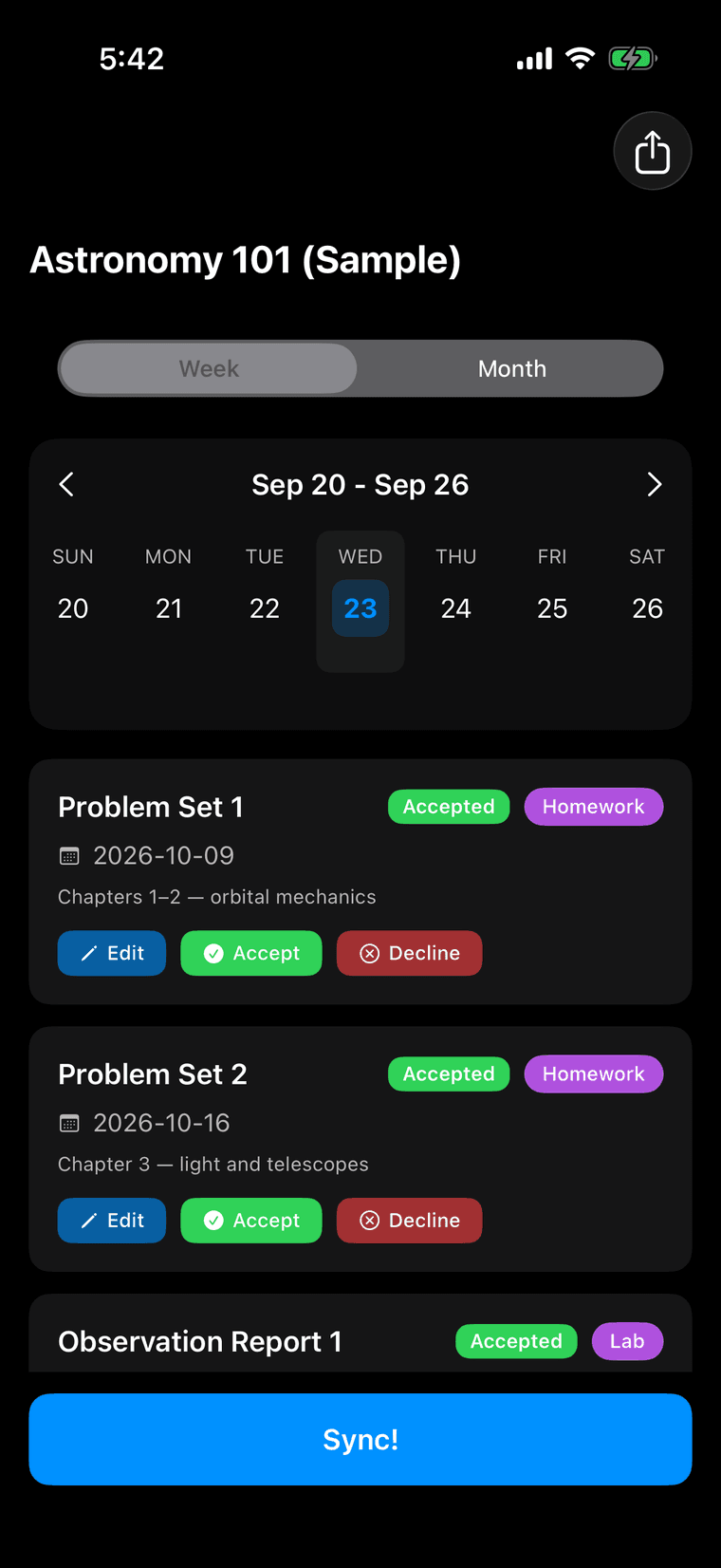
The review screen in the current build, on the app's built-in sample course. Every event arrives accepted; each can be edited or declined before Sync. Calendar
Accepted events sync to a Google Calendar made for that class, in the class's colour.
Nothing accepted for the calendar yet.
The term, weeks 1 to 11, with these dates marked: Problem Set 1, 2027-01-15; Observation Report 1, 2027-01-27; Midterm Exam, 2027-02-05; Research paper: proposal, 2027-02-15; Research paper: final draft, 2027-03-10; Final Exam, 2027-03-19.
Diagram of the term. Winter 2027, weeks 1 to 11, Monday to Friday. The same six dates, placed.
What the student keeps.
After the sync, Plannr is the view over the term.
My Classes
Every course in one list, each with its own colour and sync status. Classes can be filed into a term.
Calendar
A week or month across every class, filterable by exams, homework, labs and quizzes.
Week at a Glance
What is due this week and next, a weekend preview, and a checkbox for each thing done.
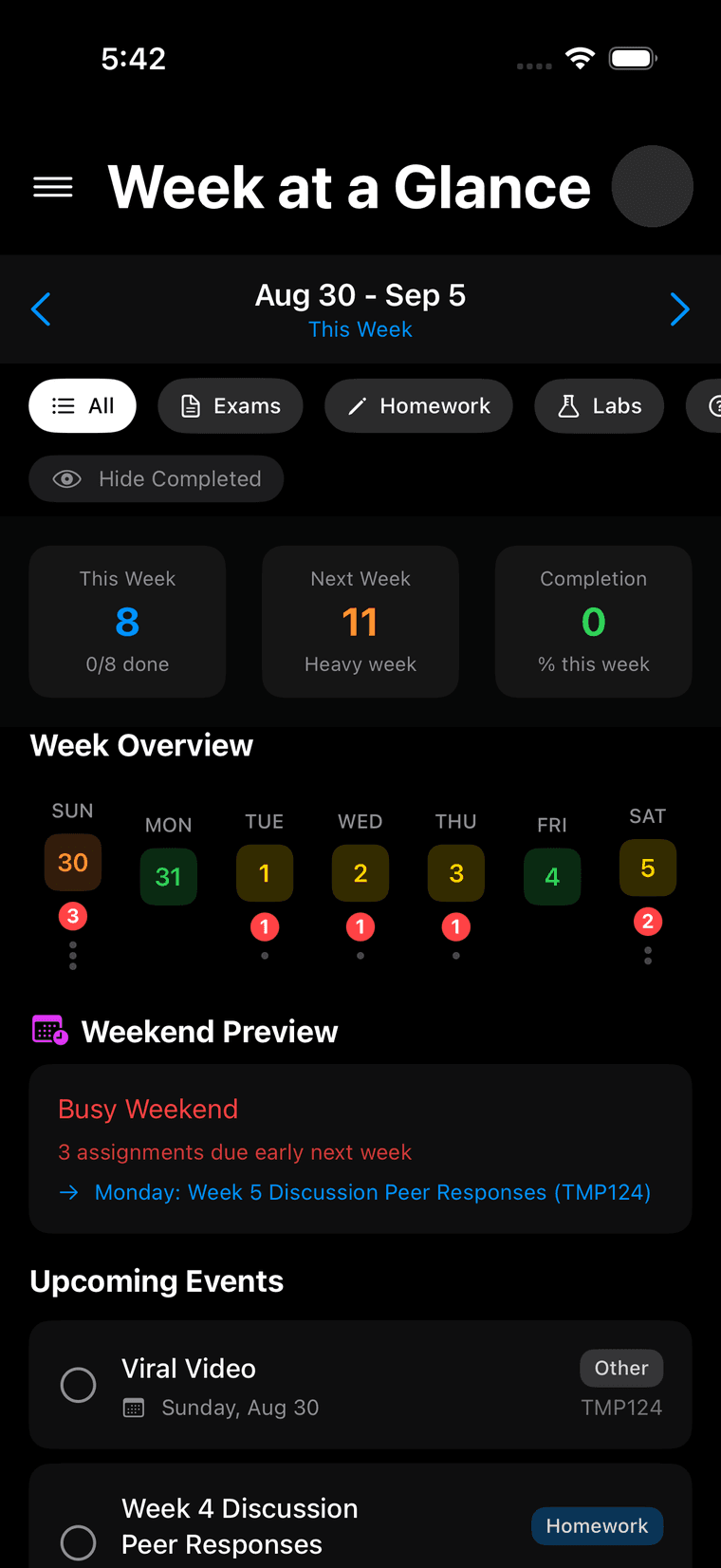
- 8 due this week, 11 next. The app itself calls it a heavy week.
- Each day with something due carries a count.
- A weekend preview: three assignments due early next week.
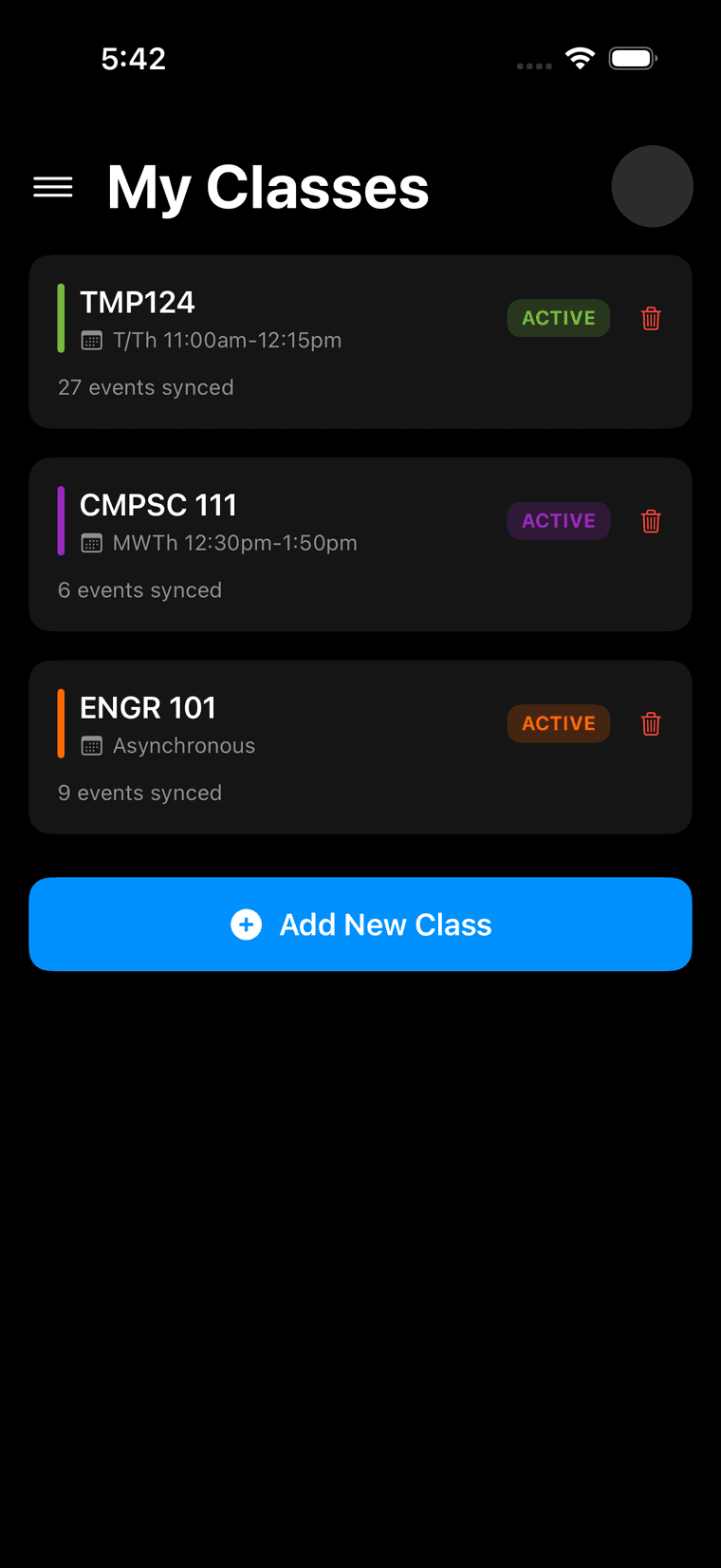
- One colour per class. 27 events synced.
What was actually difficult.
Three choices, each made because the calendar isn’t Plannr’s. It’s the student’s.
The student signs off before anything reaches a calendar.
opt-out, not opt-in
- Extraction is inference. Friday of Week 3 is a calculation, and a calculation can be wrong. A wrong date costs a student a deadline.
- Parsed events land on a review screen first. Each can be edited, declined or accepted, and only accepted events are ever sent. The extraction prompt tells the model to skip a date it cannot work out with confidence instead of guessing.
- Events arrive accepted, so review is opt-out: a student who presses Sync without looking gets what the parser found.
One calendar per class, and Plannr only patches.
patch, not update
- The calendar it writes to is the student's own. They will add a location, a note, a reminder. A sync must not erase it.
- Each class gets a dedicated secondary Google Calendar, found or created by name and coloured to match. Existing events are patched, not replaced, so anything added in Google survives a re-sync. If an event has been deleted in Google, only that one is recreated. Every event carries a private id, so a retried request updates the event it already made instead of duplicating it.
- Calendars are matched by class name.
- Professors move deadlines. Uploading the new version must not wipe the student's edits or duplicate the term.
- Re-uploads are reconciled against the class's existing events. Two events are the same when their title and date match; a local edit beats the new parse; only the difference is pushed to Google. Every sync is snapshotted, and a class can be restored to any earlier one.
- A renamed or moved assignment reads as a deletion plus an addition. The code says so itself.
How a syllabus travels.
Syllabus PDF or pasted text, up to 10 MB
The document's text goes to Gemini; structured events come back
Extraction only. Gemini never touches a calendar.
Events go back to the phone for review
The server keeps no syllabus and no events.
Accepted events, after the student presses Sync
Insert or patch on the class's own Google Calendar
- Classes, events, review edits and sync snapshots live here.
- A user record and encrypted Google credentials. No syllabi, no events.
- Gemini reads the text. Google Calendar holds the result.
Sign-in is Google OAuth 2.0. The stored refresh tokens are encrypted at rest, the app holds only an opaque session token, and the sign-in callback is bound to the attempt that started it.
A beta, running, with the code in public.
Checked 23 Sep 2026.
- A public repository: 118 commits between 13 Aug and 9 Sep 2026, continuing the team's original code.github.com/m4ttblanke/plannr ↗
- Deployed on Render and redeployed on every push to main. Database migrations run on deploy. Its health check returned 200 with the database ready when checked.The health check ↗
- A free, public TestFlight beta. The invitation is linked from the product page.The product page ↗
- 97 backend and 199 iOS test functions. CI is set up to run both suites on every push to main and every pull request.
- Beta builds report crashes to Sentry.
- A Stripe checkout and webhook path was built and tested, then set aside. The beta is free.
User counts, revenue, extraction accuracy and Google's OAuth verification are not documented anywhere in the project, so this page does not claim them.
Who built it
- UCSB CS 148, Winter 2026, seven people. Matt was product owner and built Google sign-in, the first Google Calendar sync, the accept and decline controls, exports, guest mode and class editing. Teammates built the first Gemini extraction, the week view and the input handling.The original repository ↗
- Matt continued it alone: hosting and the database, authentication hardening, sync retries and restore, term folders, the product page, and the TestFlight beta.